

A small research dataset can become difficult to interpret surprisingly quickly. Variable names such as t1_score or status_2 may seem obvious during data collection, but their meaning, units, coding rules, and missing-value conventions are easily forgotten.
A data dictionary prevents that loss of context. It records what each variable means, how it was measured, which values are valid, and how the data should be interpreted. The result is a dataset that is easier to check, analyze, share, and reuse.
Practical definition: For a small dataset, a data dictionary is usually a spreadsheet or CSV file with one row per variable and one column per metadata field.
What a data dictionary should explain
A useful data dictionary allows someone unfamiliar with the project to answer four questions:
- What does this variable represent?
- How was it measured, calculated, or assigned?
- Which values are permitted?
- How should missing, unknown, or inapplicable values be handled?
A data dictionary should describe the dataset as it actually exists, not merely the study as originally planned.
If a survey question changed, a unit was converted, or a derived variable was added, the dictionary should document that change.
Data dictionary, codebook, and schema
These terms sometimes overlap, but they emphasize different aspects of documentation:
- Data dictionary: defines variables, data types, formats, units, and valid values.
- Codebook: often provides more detail about survey questions, response categories, and study procedures.
- Schema: describes the technical structure of a database or machine-readable file, including fields, relationships, and constraints.
For a small research project, one well-designed dictionary can serve all three purposes at a practical level.
Choose a format that will remain usable
A spreadsheet is usually the simplest starting point. It is readable by researchers without specialist software and can later be exported as CSV for use in R, Python, or another analysis environment.
Use one row for each variable. Avoid merged cells, decorative blank rows, color-only meanings, and multiple values in a field when a simple structured convention would work. These features make automated checking and reuse more difficult.
Keep the dictionary beside the dataset, but do not place confidential participant information in it. The dictionary should describe identifiers without revealing identities.
Essential columns to include
The exact fields depend on the project, but the following set is sufficient for many small observational, experimental, or survey datasets.
| Column | Purpose | Example |
|---|---|---|
| variable_name | Exact field name in the dataset | age_baseline |
| label | Short human-readable title | Age at baseline |
| definition | Precise meaning of the variable | Participant age on the enrollment date |
| data_type | Technical type | Integer |
| format | Required representation | YYYY-MM-DD |
| unit | Measurement unit, where relevant | Years |
| allowed_values | Valid categories or range | 18–100 |
| missing_rule | How missingness is stored and interpreted | Blank = not recorded |
| source | Origin of the value | Enrollment form, item 4 |
| derivation | Calculation for a derived field | followup_score – baseline_score |
Use exact variable names
The variable_name entry must match the dataset exactly, including spelling and capitalization. Prefer concise names containing letters, numbers, and underscores. Avoid spaces, punctuation, and unexplained abbreviations.
A name should be stable even if its display label changes. For example, systolic_bp is easier to process than “Systolic blood pressure (mmHg)”; the complete wording and unit belong in separate dictionary fields.
Write definitions that distinguish similar variables
Do not repeat the variable label as its definition. “Follow-up score” does not explain which instrument was used, when it was administered, or how the score was calculated.
A strong definition identifies the measure, timing, population, and calculation rule needed to interpret a variable correctly.
For example: “Total score from the 10-item questionnaire administered 30 days after enrollment, calculated when at least eight items were completed.”
Separate data type, format, and unit
These fields answer different questions. A date may be stored as text but still require the format YYYY-MM-DD. A measurement may be numeric but remain ambiguous unless its unit is stated.
Common data types include:
- Integer: whole numbers such as counts or age in completed years.
- Decimal: measurements that may contain fractional values.
- Text: free responses, notes, or identifiers not used in arithmetic.
- Boolean: two-state fields such as true/false.
- Date or datetime: calendar dates or timestamps with a documented format and time zone where necessary.
- Categorical: values selected from a defined set of codes.
Define categories and missing values explicitly
Every coded category needs a label. A reader should not have to guess whether 1 means “yes,” “control group,” or “first visit.” For example:
0 = No; 1 = Yes; 9 = Unknown
Avoid using ordinary numeric values as missing codes when they could be mistaken for observations. Blank or standardized null values are often easier to handle, provided the rule is consistent. If different forms of missingness matter, distinguish them clearly, such as “not asked,” “participant declined,” and “not recorded.”
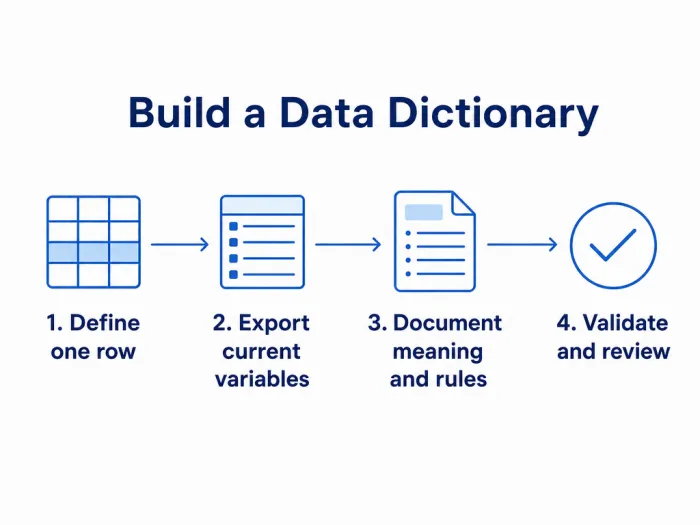
How to build the dictionary step by step
1. Define the unit of observation
State what one row represents before documenting individual variables. It might be one participant, one laboratory sample, one site per month, or one measurement event. If the dataset contains repeated observations, identify the fields that distinguish participants, visits, and time points.
2. Export the current variable list
Copy the column names directly from the analysis-ready dataset rather than relying on a protocol or an older collection form. This helps reveal renamed, removed, and newly derived variables.
3. Assign each variable a role
Classify variables as identifiers, dates, exposures, outcomes, covariates, administrative fields, or derived measures. These labels are optional, but they make a large dictionary easier to scan and help researchers identify fields required for a particular analysis.
The role should remain consistent with the study design and its research question or hypothesis. A variable is not automatically an outcome merely because it appears in the final statistical model.
4. Record provenance
Indicate whether each value came from a questionnaire, instrument, laboratory result, external database, manual classification, or calculation. When relevant, include the form name, item number, device version, or processing stage.
5. Document transformations
For every derived variable, write a reproducible rule. Include the input variables, formula, thresholds, rounding method, and treatment of missing inputs. If the logic is too long for a spreadsheet cell, refer to the relevant version-controlled analysis script.
6. Add validation rules
Define plausible ranges, permitted categories, uniqueness requirements, and cross-field checks. A visit date may need to occur on or after enrollment, for example. These rules can later become automated quality-control tests.
7. Review it with another person
Ask a colleague who did not create the dataset to interpret several variables using only the dictionary. Questions or incorrect interpretations expose vague definitions more effectively than proofreading alone.
Worked example for a small study
Imagine a dataset in which each row represents one participant and records enrollment information plus a 30-day follow-up score. A compact dictionary could look like this:
| Variable | Definition | Type / format | Allowed values | Missing rule |
|---|---|---|---|---|
| participant_id | Study-specific pseudonymous participant identifier | Text | P followed by four digits; unique | Not permitted |
| enrollment_date | Date on which the participant entered the study | Date, YYYY-MM-DD | Valid calendar date within study period | Not permitted |
| group_code | Group assigned at enrollment | Integer | 0 = comparison; 1 = intervention | Blank = assignment unavailable |
| baseline_score | Questionnaire total recorded at enrollment | Integer | 0–40 | Blank = insufficient completed items |
| followup_score | Questionnaire total at the 30-day assessment | Integer | 0–40 | Blank = no valid follow-up total |
| score_change | Change from baseline to 30-day follow-up | Integer | −40 to 40 | Blank if either input score is missing |
The final row still needs a derivation field specifying followup_score – baseline_score. This detail removes uncertainty about the direction of change.
Quality checklist before sharing the dataset
- Every dataset column appears once in the dictionary.
- Every dictionary variable exists in the current dataset.
- Variable names match exactly.
- The unit represented by one row is stated.
- Identifiers and uniqueness requirements are documented.
- Dates include a format and, when needed, a time zone.
- Measurements include units.
- All categorical codes have labels.
- Missing-value rules are explicit and consistent.
- Derived variables include formulas and input fields.
- Ranges and validation rules reflect the actual collection process.
- No confidential personal information appears in the dictionary.
- A version number and last-updated date are recorded.
- A second person has tested whether the definitions are understandable.

Maintain the dictionary as part of the research record
A dictionary is not a one-time appendix. Update it whenever variables are renamed, recoded, added, removed, or recalculated. Keep the dataset, dictionary, and analysis code under coordinated version control so that users can tell which files belong together.
A simple file name such as data_dictionary_v1.2.csv is useful, but a change log is better. Record the date, editor, affected variables, and reason for each substantive revision.
Every released dataset version should be paired with the dictionary version that describes it.
For collaboration, assign responsibility for approving changes. Without an owner, different team members may introduce conflicting definitions or coding rules. A literature review matrix serves a different purpose, but the same principles of consistent fields and explicit definitions apply.
When a spreadsheet is no longer enough
A spreadsheet remains practical for dozens or even a few hundred variables. More formal metadata tools may be appropriate when a project has multiple related tables, repeated data releases, complex access rules, or repository-specific requirements.
Projects requiring standardized metadata may need a recognized metadata standard, a consistent date and time convention, or a repository-specific schema. The appropriate choice depends on the discipline, repository, access conditions, and intended reuse.
Common mistakes to avoid
- Defining names with equally vague labels: “Score 1” does not explain score_1.
- Omitting units: a value of 12 could represent seconds, kilograms, or months.
- Mixing labels with codes: using both 1 and Yes for the same category creates inconsistent data.
- Leaving derived fields unexplained: analysts need the exact formula, not just the phrase “calculated score.”
- Overwriting earlier definitions: preserve a change history when coding rules change.
- Documenting the planned rather than released data: the dictionary must correspond to the shared file.
- Inferring meaning from statistical use: an association does not establish a variable as a cause. This distinction also matters when interpreting correlation and causation.
A practical minimum template
If time is limited, begin with these ten fields:
- variable_name
- label
- definition
- data_type
- format
- unit
- allowed_values
- missing_rule
- source
- derivation
Create the dictionary early, test it against the real dataset, and revise it whenever the data changes. These structured fields support analysis, peer review, collaboration, and future reuse within a broader research methods workflow.
Mini FAQ
Should the data dictionary be stored inside the dataset?
It can occupy a separate worksheet in a spreadsheet workbook, but a separate CSV or metadata file is often easier to version and reuse. Whichever method you choose, make the relationship between the dataset and dictionary unambiguous.
Does every variable need a unit?
No. Units apply to measurements such as time, distance, mass, concentration, or currency. Write “not applicable” for identifiers and nominal categories if leaving the field blank could cause confusion.
Should value labels be stored in the data or only in the dictionary?
Either codes or labels can work if they are used consistently. Codes may be compact, while readable labels reduce lookup effort. The dictionary should document the permitted representation in all cases.
How should free-text variables be documented?
State what respondents or researchers were expected to enter, any character limit, the language, whether line breaks are retained, and whether the text has been redacted or processed. Flag fields that could contain sensitive information.
Who should write the data dictionary?
The person closest to data collection should provide the original meaning and coding rules, while the data manager or analyst can add technical formats, transformations, and validation constraints. A joint review usually produces the most reliable result.
When should the dictionary be created?
Start before or during data collection, then reconcile it with the final dataset before analysis and sharing. Beginning early improves consistency; reviewing it at release ensures that it describes the data users will actually receive.