
Before cleaning a dataset, record its original state, provenance, structure, known limitations and every rule you intend to apply. This creates an audit trail that helps you reproduce the analysis, explain unexpected results and distinguish source-data problems from changes introduced during cleaning.
Core principle: preserve the raw data, work on a copy and document each modification. A cleaned file without a change log is difficult to verify, even when the corrections appear reasonable.
Why data cleaning must begin with documentation
Data cleaning is not simply the removal of errors. It involves decisions about what counts as valid, how missing values should be represented, whether apparently duplicated records are genuine duplicates and which transformations are appropriate for the research question.
Those decisions can affect sample size, distributions, correlations and model performance. Recording them before analysis reduces the risk of making cleaning choices because they produce a preferred result. It also gives collaborators enough information to review or repeat the process.
Your documentation should make it possible to answer four questions:
- Where did the data come from?
- What did the original dataset contain?
- What was changed, excluded or derived?
- Why was each decision made?
Preserve the raw dataset before making changes
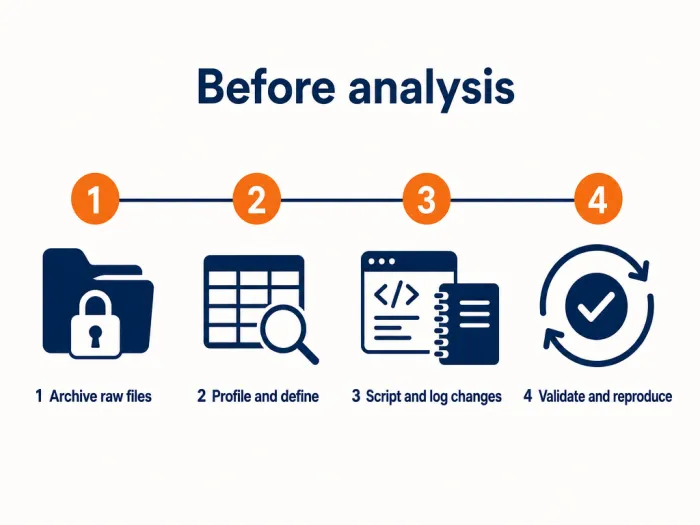
Create an immutable copy of every original file before opening, combining or converting it. If the data came from an API, database or frequently updated repository, save the extraction date and the query or parameters used.
Record the source and acquisition details
- Dataset name and short description
- Data owner, provider or collecting organization
- Source URL, database, instrument or internal system
- Date and time of download or extraction
- API endpoint, database query or export filters
- License, access restrictions and permitted uses
- File format, character encoding and compression format
- Original filename, file size and version identifier
For stronger integrity checks, calculate and store a file checksum such as SHA-256. If the checksum changes, you know that the file is no longer identical to the archived original.
Separate raw, working and analysis-ready files
A simple folder structure prevents accidental overwriting:
- Raw: untouched files exactly as received
- Working: intermediate files created during cleaning
- Processed: analysis-ready datasets
- Scripts: import, validation, cleaning and analysis code
- Documentation: data dictionary, decision log and README
Use clear filenames that include a dataset name, stage and version or date. Avoid labels such as final, final2 and final-revised, which quickly become ambiguous.
Capture a baseline profile of the original data
Before correcting anything, create a snapshot of the dataset as received. This baseline lets you measure the effects of cleaning and detect accidental loss.
| Item to record | Examples | Why it matters |
|---|---|---|
| Dimensions | Rows, columns, files and tables | Reveals unexpected row or field loss |
| Field names and types | Integer, text, date, Boolean | Identifies import and conversion problems |
| Missingness | Count and percentage by variable | Shows where exclusions or imputation may be needed |
| Unique values | Category levels and identifier counts | Exposes spelling variants and suspicious duplicates |
| Numeric summaries | Minimum, maximum, median and quantiles | Highlights impossible or extreme values |
| Date and location ranges | Earliest date, latest date and geographic coverage | Confirms whether coverage matches the study scope |
| Duplicate candidates | Exact rows or repeated identifiers | Provides a baseline before deduplication |
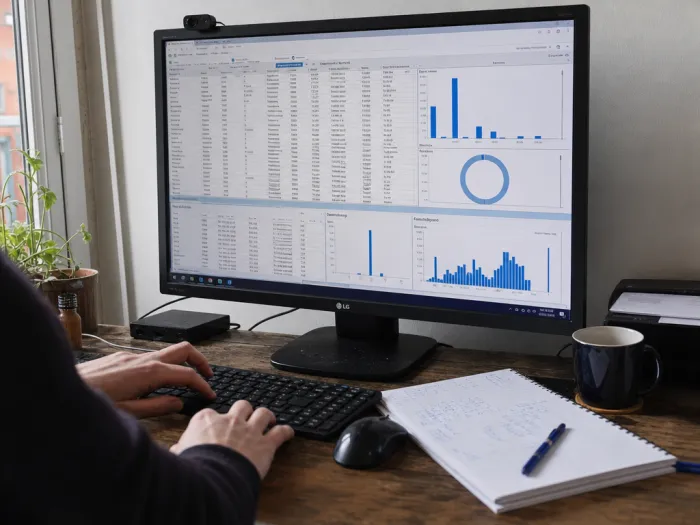
Save this profile as a machine-readable output when possible, not only as notes or screenshots. It can then be compared automatically with the processed dataset.
Build or verify the data dictionary
A data dictionary explains what each variable represents. Do not infer definitions from abbreviated column names when the original collector or domain specialist can clarify them.
For every field, record:
- Original variable name and any standardized name
- Plain-language definition
- Data type and expected format
- Unit of measurement and measurement scale
- Allowed values or valid range
- Category codes and reference level
- Missing-value codes
- Collection method or source system
- Precision, rounding rules and detection limits
- Whether the field contains personal or sensitive information
Do not treat units as an afterthought
A value of “10” is not interpretable without knowing whether it represents kilograms, pounds, seconds, percentages or a coded response. Record mixed units before converting them, including the conversion formula and the unit used in the processed dataset.
Document category codes
Codes such as 0, 9, 99, “N/A” and blank cells may represent valid categories, missing observations or values outside an instrument’s range. Confirm their meaning before replacing them.
A blanket conversion of every unusual code to zero or null can destroy information.
Define missing-data rules before applying them
Start by listing every representation of missingness. These might include empty cells, special numeric codes, dashes, text labels or database null values. Standardize them only after confirming that they have equivalent meanings.
Record whether a missing value means:
- The information was not collected
- The participant did not respond
- The question was not applicable
- The measurement failed
- The value was suppressed for confidentiality
- The value is structurally impossible for that record
These situations are not automatically interchangeable. Document any complete-case exclusion, imputation method or missingness indicator you plan to use. Include the variables involved, the rationale and the number of records affected.
Specify rules for duplicates, identifiers and joins
Repeated rows are not always duplicate observations. A person, device or location may legitimately have several records across dates or events. Define the unit of observation before deleting anything.
Identify the expected key
Record which field or combination of fields should uniquely identify a row. Test that assumption and save the results. If the key is not unique, determine whether the cause is repeated measurement, data-entry duplication, inconsistent identifiers or an incorrect assumption about the dataset.
Plan dataset joins explicitly
Before merging files, document:
- The join keys and expected relationship: one-to-one, one-to-many or many-to-one
- Whether key formats require standardization
- The expected number of matched and unmatched records
- How conflicting values will be handled
- Which file is authoritative for shared fields
- How records without a match will be retained or excluded
After each join, compare row counts and key uniqueness with the expectations recorded beforehand.
An unplanned many-to-many join can multiply observations and distort every subsequent statistic.
Predefine validation and outlier rules
A validation rule should be based on the meaning and collection process of a variable, not solely on whether a value looks unusual. Distinguish impossible values, data errors and plausible extreme observations.
| Rule type | Example question | Possible response |
|---|---|---|
| Range | Can this value occur within the measurement system? | Flag, verify against source or set to missing with justification |
| Format | Does the date or identifier follow the required pattern? | Parse, standardize or quarantine invalid records |
| Logical consistency | Does an end date precede its start date? | Check related fields and the original source |
| Cross-field consistency | Do age and date of birth agree? | Apply a documented precedence rule |
| Statistical outlier | Is the value extreme but still possible? | Retain, transform or exclude only with an analytical rationale |
Keep a flag for questionable values whenever practical. This preserves the original observation and lets you compare results with and without flagged records.
Record every transformation in a cleaning log
The cleaning log is the central audit trail. One row per operation is usually more useful than a narrative written after the work is complete.
Include these fields:
- Step number and date
- Input and output file or table
- Variable or records affected
- Original condition detected
- Rule or transformation applied
- Reason for the decision
- Number of rows changed, removed or flagged
- Script, function or query responsible
- Software and package versions
- Person responsible and reviewer, when applicable
Example cleaning-log entry
Step: 07
Issue: Three labels—“United States,” “USA” and “U.S.”—appear in the country field.
Action: Map all three labels to the project’s approved country code.
Reason: The data dictionary defines a single standardized code for this country.
Impact: 184 rows changed; no rows removed.
Implementation: Transformation script, version-controlled commit recorded in the project log.
Avoid undocumented manual edits in spreadsheets. If a manual correction is unavoidable, record the cell, previous value, replacement value, evidence and person making the change.
Protect against leakage and premature analysis
For predictive modeling, some cleaning steps must be learned from the training data rather than the complete dataset. Examples include imputation values, scaling parameters, feature selection and category-frequency thresholds. Calculating them on the full dataset can leak information from validation or test observations into model development.
Record when the data split occurs and identify which transformations are fitted on the training partition. Keep the untouched test set separate until the analysis plan permits evaluation.
For hypothesis-driven research, define exclusion and recoding rules before inspecting outcome patterns where possible. This does not eliminate judgment, but it makes deviations from the original plan visible. Clear distinctions between a research question and a hypothesis can also help align cleaning decisions with the intended analysis.
Data cleaning checklist before analysis
- ☐ Archive an untouched copy of every original file.
- ☐ Record provenance, extraction date, license and access conditions.
- ☐ Save filenames, file sizes, versions and checksums.
- ☐ Document the unit of observation and expected unique key.
- ☐ Record baseline row counts, column counts and data types.
- ☐ Measure missingness, unique values and duplicate candidates.
- ☐ Create or verify a data dictionary.
- ☐ Confirm units, category codes and missing-value conventions.
- ☐ Define valid ranges and cross-field consistency checks.
- ☐ Distinguish impossible values from plausible outliers.
- ☐ Specify deduplication and dataset-joining rules.
- ☐ Record exclusions, transformations and derived variables.
- ☐ Note software, package and script versions.
- ☐ Protect personal or sensitive fields appropriately.
- ☐ Create a row-level or operation-level cleaning log.
- ☐ Compare the processed dataset with the original baseline.
- ☐ Ask a second person to review high-impact decisions when possible.
- ☐ Keep analysis-ready data separate from raw and intermediate files.
What to verify after cleaning
Documentation before cleaning is only useful if you reconcile it with the final result. Repeat the baseline profile and explain every material difference.
At minimum, verify:
- Final row and column counts
- Records added, removed, merged or split
- Changes in missingness
- Uniqueness of identifiers
- Validity of ranges and category levels
- Success and failure counts for joins
- Distribution changes caused by exclusions or transformations
- Reproducibility from raw input to processed output
Run the complete workflow in a clean environment if possible. A successful rerun helps reveal hidden dependencies, unsaved manual changes and steps performed outside the documented process. When interpreting the resulting relationships, preserve the distinction between correlation and causation.
A practical minimum documentation package
A small project does not require a complicated data-governance system. A defensible minimum package can consist of:
- An untouched raw-data folder
- A README describing provenance, structure and workflow
- A data dictionary defining variables and codes
- A scripted cleaning pipeline
- A cleaning log explaining decisions and their impact
- A validation report comparing raw and processed data
The processed dataset should be reproducible from the archived raw files without relying on undocumented manual changes.
Mini FAQ
Should I remove every duplicate row?
No. First confirm the unit of observation and the expected key. Identical rows may represent repeated events, valid measurements or genuine duplication. Record the rule and evidence before deleting records.
Should outliers be deleted before analysis?
Not automatically. An outlier may be a data error, a rare valid observation or an important feature of the population. Verify its plausibility and document any exclusion, transformation or sensitivity analysis.
Is a spreadsheet enough for a cleaning log?
It can be sufficient for a small project if it records each decision consistently. However, transformations should be scripted whenever possible so they can be repeated and reviewed.
What is the difference between a data dictionary and a cleaning log?
A data dictionary defines fields, units, formats and codes. A cleaning log records what was changed, why it was changed and how many observations were affected. Most projects need both.
How much detail should be recorded?
Record enough detail for another qualified person to reproduce the processed dataset without guessing. Decisions affecting exclusions, missing values, identifiers, joins or outcome variables deserve particular attention.
When is data cleaning complete?
Cleaning is complete when predefined validation checks pass, unresolved issues are documented and the processed dataset can be regenerated from the raw files. New analytical questions may require additional checks, so the log should remain open to versioned updates.